Use ONVIF Profile M when a perimeter workflow needs standardized analytics metadata and events between a conformant device or service and a conformant client. It can improve interoperability among analytics sources, gateways, VMS platforms, and other applications, but it is not a universal protocol for every PIDS, fence sensor, or DAS interrogator.
A defensible design requires more than an "ONVIF supported" statement. Verify the exact device, service, client, firmware, and software versions in the official ONVIF database. Then freeze a project-specific event contract and test the complete path from physical detection through operator verification.
Profile M can coexist with Profile T or Profile S for video. Its primary role is analytics metadata and events, not satisfying every video-streaming requirement.
What ONVIF Profile M Standardizes
ONVIF defines Profile M for metadata and events used by analytics applications. It covers analytics configuration and information queries, metadata filtering and streaming, generic object classification, and specified metadata structures for information such as geolocation, vehicles, license plates, faces, and human bodies when the product supports those capabilities.
A Profile M product may be an edge device such as an analytics camera, a server or cloud analytics service, or a client such as a VMS, NVR, or server application. For perimeter security, that scope can support video analytics, alarm-enrichment services, or a gateway that exposes normalized metadata. It does not make every native PIDS alarm a Profile M event.

Metadata Streaming Is the Mandatory Baseline
Metadata-stream support is mandatory for Profile M conformant products. The specification establishes device and client requirements for discovering, configuring, requesting, and receiving the metadata path. A project should validate this baseline even when another supported event-delivery interface is intended for daily operations.
The current Profile M specification describes mandatory metadata configuration and client retrieval requirements, with additional functions becoming conditional or optional according to the feature.
Event Service and MQTT Are Conditional
Profile M also defines conditional interfaces. They apply when the conformant product supports the associated feature. Examples include the ONVIF Event Service, MQTT event delivery, images associated with metadata, video streaming, rule configuration, and specific analytics classifications.
MQTT is not mandatory for every Profile M implementation. The ONVIF Event Service is also conditional within Profile M. The official Profile M presentation distinguishes the mandatory standardized metadata stream from conditional Event Service and MQTT event paths. Procurement documents must state which conditional features the project requires.
Profile M Does Not Replace the Video Profile
Profile M may be combined with Profile T or Profile S. In a perimeter workflow, Profile M can carry analytics metadata while a video profile addresses codec, streaming, imaging, and other media requirements.
Profile M video streaming is conditional, so Profile M conformance alone does not prove that a device satisfies the full video design. The broad choice between an ONVIF integration and a basic stream path belongs in the ONVIF versus RTSP guide. This page owns the metadata and event contract.
Verify Both Ends of the Integration
A Profile M path has at least one provider and one consumer: the device or service that exposes metadata and the client that discovers, receives, and interprets it. Both products must support the required interfaces. Conformance on one side does not prove an interoperable project pairing.
The ONVIF conformant-products database is the authoritative source for official conformance. Verify the exact product name, model, device or client classification, Profile M listing, firmware or software version, manufacturer, and required conditional features.
ONVIF membership, use of an ONVIF specification, a vendor datasheet, or a general compatibility claim is not the same as official product conformance. Official conformance also does not replace site acceptance: it does not prove that two products implement the project zone model, alarm lifecycle, camera mapping, or operator workflow correctly.
Profile M Perimeter Decision Matrix
Conformant analytics provider and conformant VMS client: strong candidate for native metadata exchange; validate the exact feature pairing and versions.
Conformant analytics service enriches camera events: use when the required metadata semantics, timing, and lifecycle tests pass.
Non-ONVIF fence sensor or DAS connects to a gateway: accept Profile M claims only when the exposed gateway or service interface is officially conformant and project-tested.
Project requires MQTT: specify this conditional path explicitly and verify publisher, broker, client, reconnect, and lifecycle behavior.
Project requires only video streaming: Profile M is not the primary selection criterion; evaluate the appropriate video profile and media architecture.
Source exposes only proprietary alarms: use a controlled proprietary integration or a tested normalization service; no automatic Profile M interoperability exists.
Client ignores required project fields: nominal conformance may not satisfy operations; redesign the contract or reject the pairing.
Project requires chainage or custom classifications: define mappings and missing-value behavior rather than assume universal mandatory support.
Build a Perimeter Event Contract
Profile conformance identifies standardized interfaces, but the project still needs an event contract. That contract states what the source, gateway, VMS, and SOC exchange for each perimeter condition. Site chainage, zone identifiers, confidence values, camera mappings, and operational states may be project requirements rather than universal Profile M obligations.
Event-Contract Worksheet
Source identity: device, service, sensor, gateway, and channel; prove that the client distinguishes every approved source.
Topic or class: intrusion, climb, cut, dig, person, vehicle, tamper, fault, or project class; confirm stable interpretation.
State and lifecycle: active, update, inactive, clear, acknowledged, suppressed, restored, and any project-defined transition.
Timestamp: source-event time, time basis, synchronization limit, transport behavior, and missing-time fallback.
Zone: operational sector or fence segment and its physical reference in the site plan.
Chainage or geolocation: distance or coordinates where supported, including units, reference origin, expected accuracy, and null behavior.
Classification and confidence: source-provided class and scale where available; define safe handling of unknown or absent values.
Camera association: verification camera, preset, or fixed view and the behavior when it is unavailable.
Snapshot or metadata attachment: supported image or metadata object, retrieval method, retention, and load behavior.
Health and fault: device, stream, communications, analytics, clock, and integration status routed separately from security alarms.
A missing optional confidence value, snapshot, class, or coordinate must not silently discard a valid perimeter alarm. Coordinate timing with the PIDS latency and response-time budget and map the presentation into the documented SOC perimeter-alarm workflow.
Mapping Non-ONVIF Fence and DAS Alarms
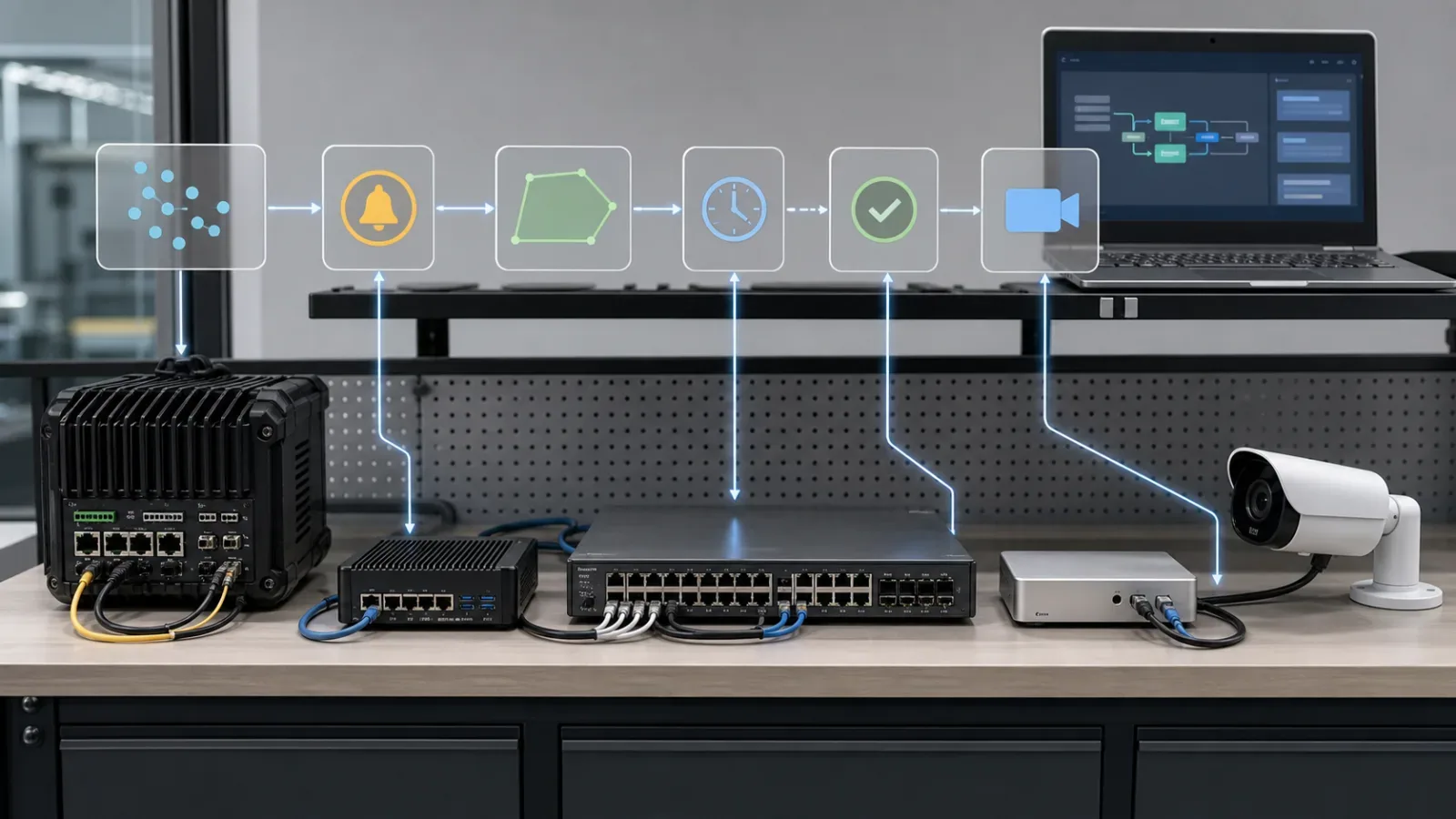
Many fence sensors, fiber systems, and DAS interrogators expose events through proprietary APIs, relays, brokers, or vendor services. Profile M does not automatically convert those sources into ONVIF devices.
Receive the native source alarm through the approved interface.
Normalize source, zone, state, event time, classification, and health.
Associate the event with cameras, chainage, or geospatial context where available.
Expose metadata through a tested Profile M interface only when the provider is officially conformant for that version.
Keep parallel automation interfaces documented and independently controlled.
A custom adapter that resembles ONVIF should not be represented as conformant unless the exact product or service appears in the official database. When downstream automation also uses webhooks or REST APIs, define ownership, retries, deduplication, authentication, ordering, and lifecycle behavior for each path.
Validate the Complete Perimeter Workflow
Test the intended production versions, network controls, clocks, VMS, gateway, cameras, and detection source. Record unsupported conditional features as deliberate limitations rather than unexplained failures.
Verify the exact provider and client versions in the ONVIF conformant-products database.
Confirm discovery, capability reporting, metadata configuration, stream URI, and receipt of the mandatory metadata stream.
Discover supported event topics before creating filters or mappings.
Test Event Service and MQTT only when the products claim and the project requires those conditional interfaces.
Confirm unsupported optional features fail predictably without suppressing core alarms.
Disconnect and reconnect the source, client, broker, and network path; verify subscription renewal and restart recovery.
Inject duplicate and out-of-order events and confirm deterministic processing.
Measure timestamp behavior under accepted and excessive clock drift.
Test alarm activation, update, clear, suppression, restoration, and stuck-alarm prevention.
Confirm every logical zone maps to the intended physical perimeter section.
Verify chainage, geolocation, class, or confidence only for sources that support the required data.
Confirm the associated camera produces a usable view of the correct sector.
Test metadata or snapshot delivery, health events, and redundant failover where supported.
Preserve packet captures, event exports, configurations, screenshots, and witnessed results.
Validate camera selection and presentation against the perimeter alarm camera-verification guide. An event is not operationally complete merely because it reaches the VMS.
Common Specification Mistakes
Writing "ONVIF compatible" without naming Profile M, role, exact product, and version.
Verifying the provider while ignoring client conformance and conditional feature support.
Treating MQTT as mandatory or assuming Profile M satisfies all video requirements.
Representing every PIDS or DAS alarm as native ONVIF metadata without a conformant provider.
Omitting alarm-clear, recovery, fault, and lifecycle semantics.
Mapping a logical zone name without proving its physical perimeter reference.
Treating chainage, confidence, class, and camera association as universally mandatory fields.
Ignoring reconnect, duplication, ordering, clock drift, and failover behavior.
Accepting a vendor demonstration instead of witnessed production-version test cases.
Implementation Note
Freeze the event contract before integration development or procurement acceptance. Maintain a controlled matrix of source and client versions, supported interfaces, event topics, field mappings, optional features, zone references, camera associations, failure behavior, and test evidence.
When firmware, analytics models, gateways, VMS software, or event mappings change, repeat the affected discovery, subscription, lifecycle, timing, zone, and verification tests. Official conformance remains tied to the listed product version; project acceptance remains tied to installed behavior.
For high-consequence sites, align the contract with the broader critical-infrastructure perimeter architecture. Review how FortSense 4 supports perimeter zones and verification workflows, then request an integration review before freezing the product pairing and acceptance procedure.
Source and Scope Controls
Profile M purpose, product roles, metadata, event paths, and combined profiles: ONVIF Profile M overview.
Mandatory and conditional device and client functions: ONVIF Profile M Specification v1.1.
Mandatory metadata stream and conditional Event Service and MQTT paths: ONVIF Profile M presentation.
Official product and version conformance: ONVIF conformant-products database.
Separate advanced-video profile scope: ONVIF Profile T overview.
Where Profile M carries event location, map that location into verified views with the geospatial perimeter alarm-to-camera guide.
Profile M event metadata can be exported one way when the security network must remain isolated. The data diode integration guide explains how sender and receiver proxies preserve directionality without turning metadata export into remote control.