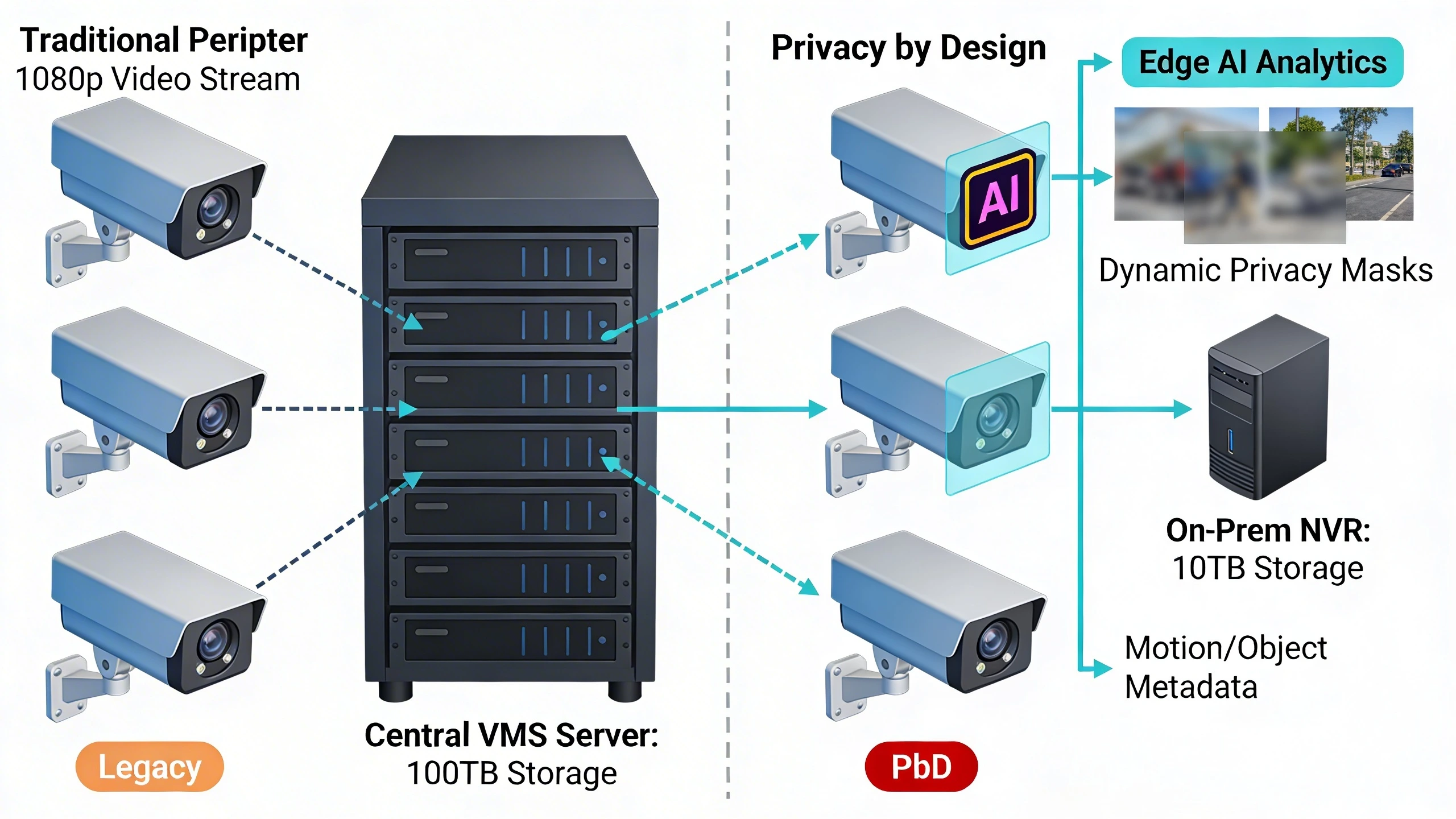
Upgrading perimeter cameras at a remote utility substation or expansive industrial campus often triggers a pivotal design choice: how to deliver reliable threat detection while preempting privacy risks from the ground up. Legacy systems typically pipe unfiltered video streams to centralized servers, accumulating vast archives that complicate compliance with data protection mandates and expose organizations to fines or operational disruptions during audits. Privacy by Design flips this model, integrating controls like selective field-of-view masking and on-device analytics directly into the camera's core functions, ensuring only essential metadata travels the network.
Picture a retrofit across a fenced perimeter spanning several acres: teams replace PTZ and fixed cameras not just for higher resolution, but to enable proactive privacy. Instead of blanket recording, these units process motion events locally, anonymizing bystander data and triggering alerts only on verified intrusions. This approach cuts storage needs, eases bandwidth constraints in fiber-scarce areas, and aligns with foundational principles that treat privacy as a non-negotiable system attribute rather than an afterthought add-on.
For security managers and integrators, the decision manifests in tangible tradeoffs—edge computing adds upfront cost but averts the cascading liabilities of data over-collection. What follows details the practical mechanics, from architecture to field realities, equipping teams to navigate these upgrades confidently.
What the design decision looks like in practice
In a real-world deployment, Privacy by Design for perimeter cameras translates to configurations where hardware and software conspire to minimize data exposure without sacrificing detection fidelity. At a multi-building campus, for instance, cameras positioned along access gates and perimeter walks might employ dynamic masking: non-security zones like adjacent parking areas get pixelated in real-time, while fence-line views remain crisp for intrusion analytics. Operators configure these via the camera's web interface or VMS plugin, setting rules based on time-of-day or event triggers, so a delivery truck's license plate blurs unless correlated with an access denial.
This isn't theoretical polish; it's a response to field pressures where incidental captures—maintenance crews, wildlife, or public paths—can trigger privacy complaints. On-device AI classifies objects before transmission, sending compact JSON metadata (position, type, confidence score) instead of video clips. During a threat event, like a climb attempt, the system escalates to full-frame capture with audit-trail logging, but defaults to ephemeral processing otherwise. Integrators report smoother handoffs to incident response teams, as alerts arrive contextualized and compliant-ready.
Transitioning from conventional setups requires mapping existing coverage to PbD equivalents. A direct swap might involve recalibrating fields of view to exclude public sightlines, paired with firmware that enforces retention policies—say, 24 hours max for non-alert footage, auto-purged thereafter.
System architecture and integration considerations
At the architectural core, PbD demands a distributed model where cameras act as intelligent endpoints rather than dumb sensors. Perimeter deployments typically layer PoE-enabled units across switches hardened against environmental extremes, feeding into an on-premises NVR or VMS with segregated storage partitions for raw vs. anonymized data. Edge modules—often embedded GPUs in the camera housing—handle analytics workloads, offloading the core server from constant decoding and reducing latency for real-time decisions.
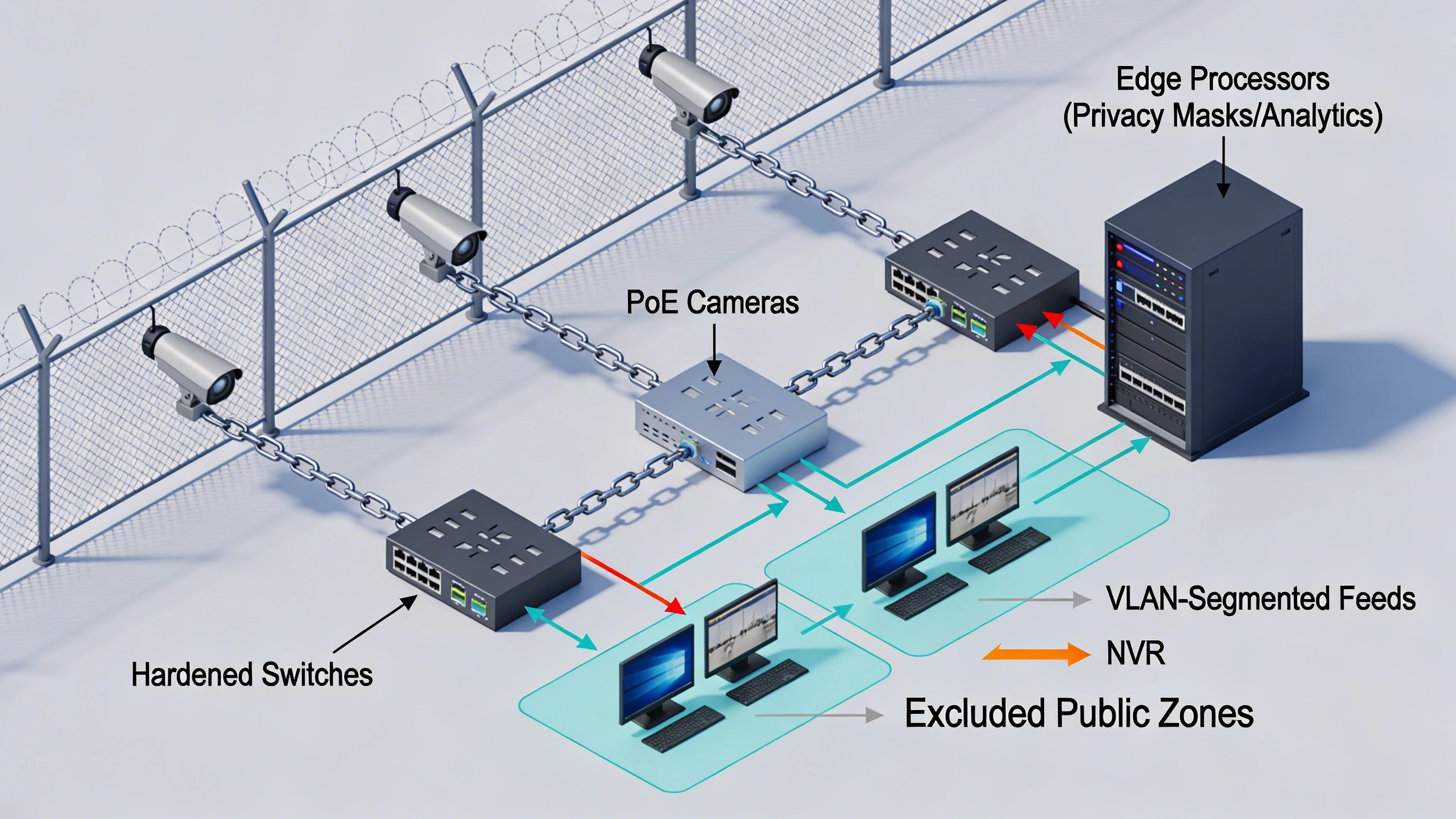
Integration hinges on open standards for interoperability; cameras supporting relevant profiles ensure seamless handshakes with access control systems or alarm panels. Network segmentation is non-negotiable: privacy-sensitive streams route via VLANs to isolated analyzers, preventing crossover with operational IT. For hybrid sites, this might mean API bridges to cloud-based compliance dashboards, but always with local fallback to maintain uptime during outages. Bandwidth planning shifts dramatically—metadata bursts peak at kilobytes per event versus gigabytes of video, freeing capacity for multi-camera scaling.
Storage architecture evolves too, with object stores enforcing granular access: analysts query events by metadata filters, reconstructing clips only on demand with privacy redactions applied. This setup not only complies but enhances scalability, as teams expand coverage without proportional infrastructure growth.
Operational workflows and field constraints
Day-to-day operations under PbD emphasize workflows that sustain privacy without burdening field teams. Maintenance rounds now include verifying mask alignments post-weather events, using camera test patterns to confirm no PII leakage into adjacent frames. Operator training focuses on dashboard interpretations—distinguishing metadata alerts from escalated video—while shift logs capture privacy mode confirmations, streamlining regulatory reporting.
Field constraints shape these routines profoundly. In harsh climates like coastal utilities, cameras must withstand salt corrosion while running power-efficient edge processing to avoid frequent battery swaps in solar setups. Bandwidth-limited sites dictate hybrid modes: full analytics local, with optional uplink for central correlation during high-threat periods. Firmware updates roll out in staged clusters to minimize exposure windows, often via secure USB for air-gapped perimeters.
Incident response adapts accordingly; responders access geo-fenced views on mobile apps, with built-in anonymization toggles. This keeps workflows fluid, turning potential compliance hurdles into operational strengths.
Common failure points and design mistakes
Many PbD rollouts falter at the configuration layer, where default factory settings prioritize coverage over discretion. Integrators overlook enabling privacy profiles during initial setup, leading to unmasked streams that flood archives with unnecessary PII. Another pitfall: assuming all edge analytics are equal—cheaper units might classify crudely, generating false positives that force full-video fallbacks and undermine data minimization.
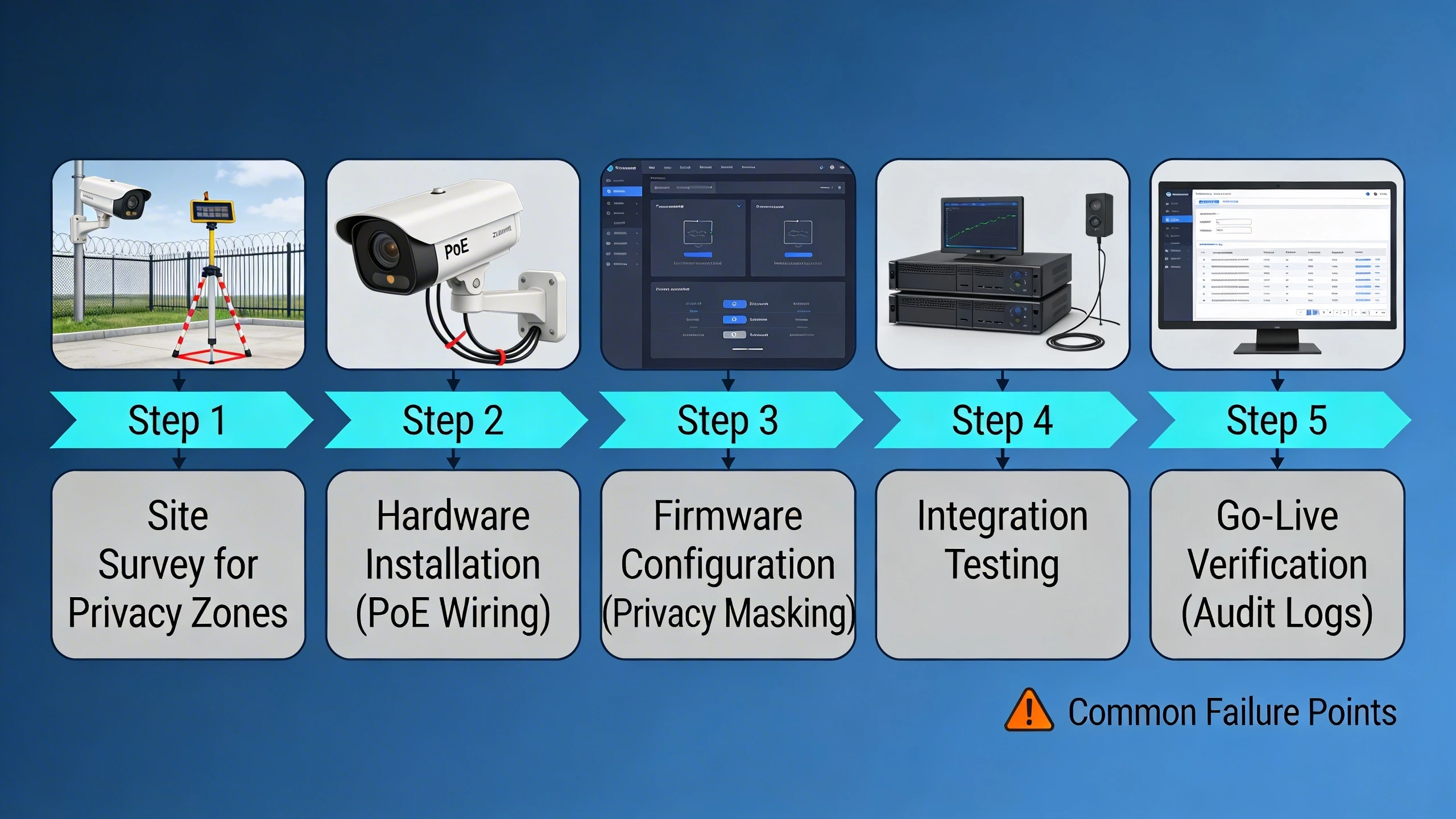
Network missteps compound issues; unsegmented traffic risks lateral exposure, especially if VMS plugins lack end-to-end encryption for metadata. Field teams also trip on scalability oversights, like ignoring PoE budgets when clustering high-compute cameras, causing dropouts that prompt risky workarounds like disabling analytics.
- Skipping site surveys for incidental capture zones, resulting in post-deploy masking retrofits.
- Ignoring firmware audit logs, obscuring proof of compliance during inspections.
- Over-relying on vendor claims without testing integration under load.
What to verify before procurement
Procurement diligence starts with dissecting datasheets for native PbD support: confirm on-device object classification, dynamic masking APIs, and metadata export formats independent of video. Request demo units to validate real-world performance—test under low light if perimeters include dusk patrols, ensuring analytics hold up without resolution crutches.
Dig into ecosystem fit: does the camera handshake with your VMS for privacy overlays? Check retention controls and exportable logs for tamper-evident privacy events. Field-proofing matters—IP67+ ratings, wide temp ranges, and IK10 impact resistance guard against tampering that could bypass controls.
- Validate standards alignment, like GDPR-inspired features for data minimization.
- Assess update cadences and secure boot to block tampered firmware.
- Probe total cost beyond hardware: edge licensing, training, and integration hours.
Where to go next
Platforms like FortSense 4 embed these principles for seamless perimeter builds. Dive into critical infrastructure security insights or review North America deployments. Request a design review to tailor this to your site.
Image Production Brief (Internal - Remove Before Publish)
Recommended image count: 3
- Placement: After the introduction
Insert After: Introduction
Purpose: Contrasts legacy and PbD setups to visually anchor the retrofit scenario and primary design shift.
Prompt: Technical side-by-side diagram: left side shows traditional perimeter cameras streaming full HD video over network to central VMS server with large storage; right side depicts Privacy by Design cameras performing edge AI analytics, applying dynamic masks, and sending only metadata to on-prem NVR.
Alt Text: Traditional vs Privacy by Design perimeter camera architectures - Placement: After the system architecture section
Insert After: System architecture and integration considerations
Purpose: Depicts a realistic topology to clarify distributed processing and segmentation for integrators planning deployments.
Prompt: Detailed network topology diagram for a utility perimeter: chain of PoE cameras along fence line connected to hardened switches, edge processors handling privacy masks and analytics, VLAN-segmented feeds to NVR, with arrows showing minimal data flows and excluded public zones.
Alt Text: Privacy-enabled perimeter camera network topology - Placement: After the common failure points section
Insert After: Common failure points and design mistakes
Purpose: Provides a step-by-step migration visual to guide teams away from pitfalls during upgrades.
Prompt: Flowchart diagram of migrating from legacy to Privacy by Design perimeter cameras: steps include site survey for privacy zones, hardware installation with PoE wiring, firmware configuration for masking, integration testing, and go-live verification with audit logs.
Alt Text: Migration flowchart for Privacy by Design camera upgrades