When upgrading access control at a distributed utility facility, the need for remote troubleshooting often clashes with air-gapped network policies. Legacy systems tied to on-premises servers limit field technicians to physical site visits, driving up response times during outages. A well-designed remote access layer changes this dynamic, allowing centralized teams to push configurations or pull event logs over encrypted channels while maintaining isolation from corporate IT.
The core tradeoff centers on connection models: persistent inbound tunnels risk lateral movement if breached, while outbound-only proxies from site gateways minimize attack surface but complicate real-time video streaming. In practice, hybrid approaches prevail in high-assurance environments, routing commands through cloud intermediaries that enforce zero-trust verification. This setup supports multi-tenant operations, like a campus managing dozens of buildings, without per-site VPN concentrators.
For retrofit projects, starting with an audit of existing protocols—such as ONVIF for cameras—reveals integration friction points early. Teams that overlook these often end up with fragmented access, where doors respond to mobile apps but intrusion panels remain siloed.
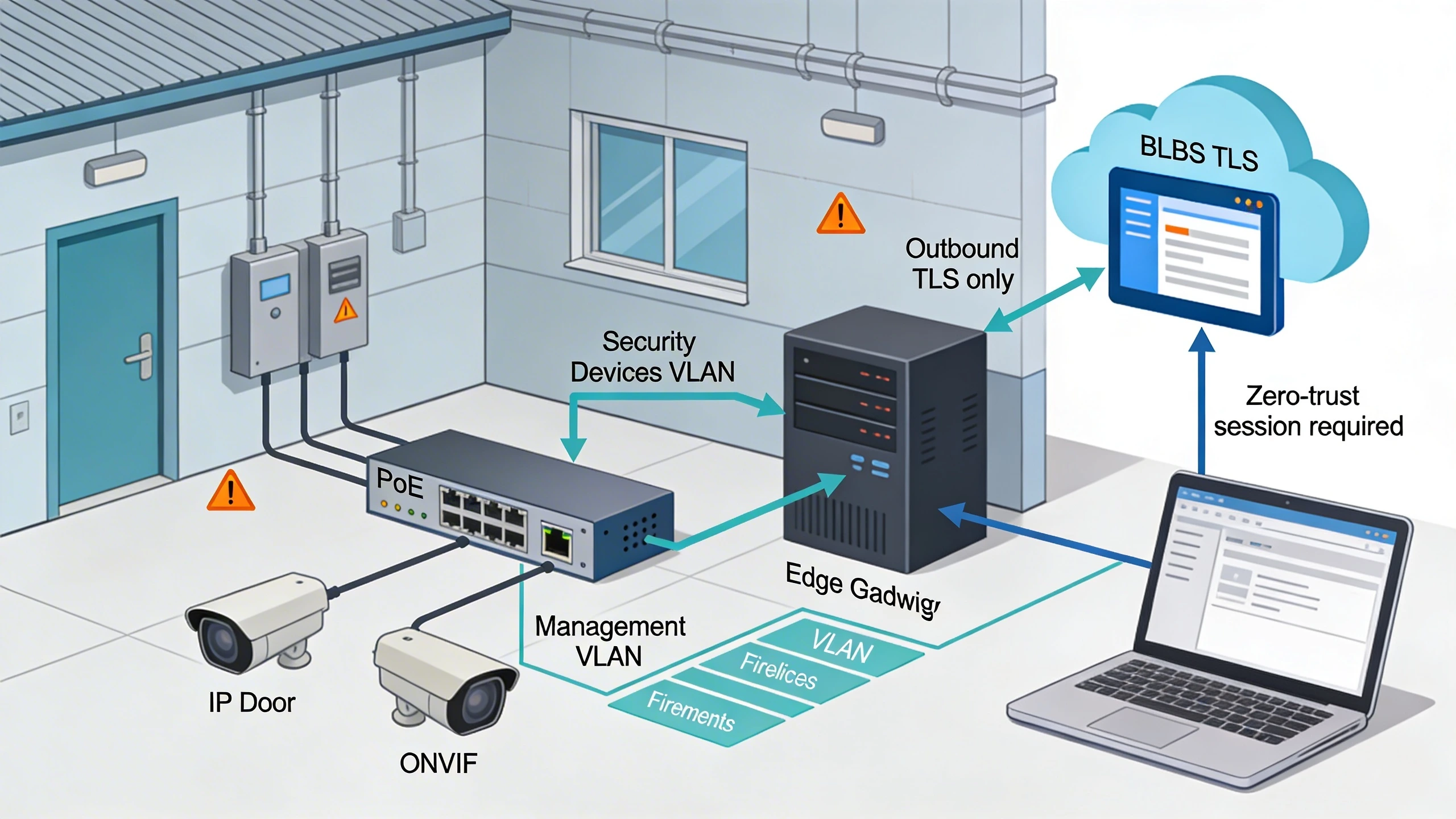
What the design decision looks like in practice
Picture a multi-building campus retrofit where integrators replace proprietary keypads with IP-enabled door controllers. Without remote access, firmware updates require dispatching crews to each site, a process that spans weeks amid scheduling conflicts. Introducing a design with edge gateways at each building aggregates traffic from controllers and cameras, funneling it outbound to a management portal. Admins then connect via browser-based sessions, authenticating through multi-factor before accessing live views or arming zones.
This manifests differently across scales. At a single utility substation, a compact gateway might suffice, polling sensors every 30 seconds over MQTT. For enterprise campuses, designs scale with containerized proxies that shard traffic by subsystem—access separate from video—to isolate failures. The decision hinges on latency tolerance: sub-second badge grants demand low-jitter paths, favoring dedicated circuits over internet VPNs. In one observed deployment, shifting to token-based sessions cut login times by half, though exact gains vary by baseline.
Real-world validation comes from pilot testing. Integrators simulate outages by yanking gateway power, confirming failover to local caching. This practice exposes whether the design truly decouples remote dependency from core operations.
System architecture and integration considerations
Core architectures split into gateway-centric and cloud-native models. Gateways sit inline or parallel to field devices, translating proprietary serial protocols to IP with protocol wrappers like ONVIF for cameras. They enforce outbound TLS to cloud endpoints, using certificate pinning to block MITM attacks. Integration demands mapping device APIs to a unified abstraction layer; mismatched schemas lead to polling loops that overwhelm bandwidth.
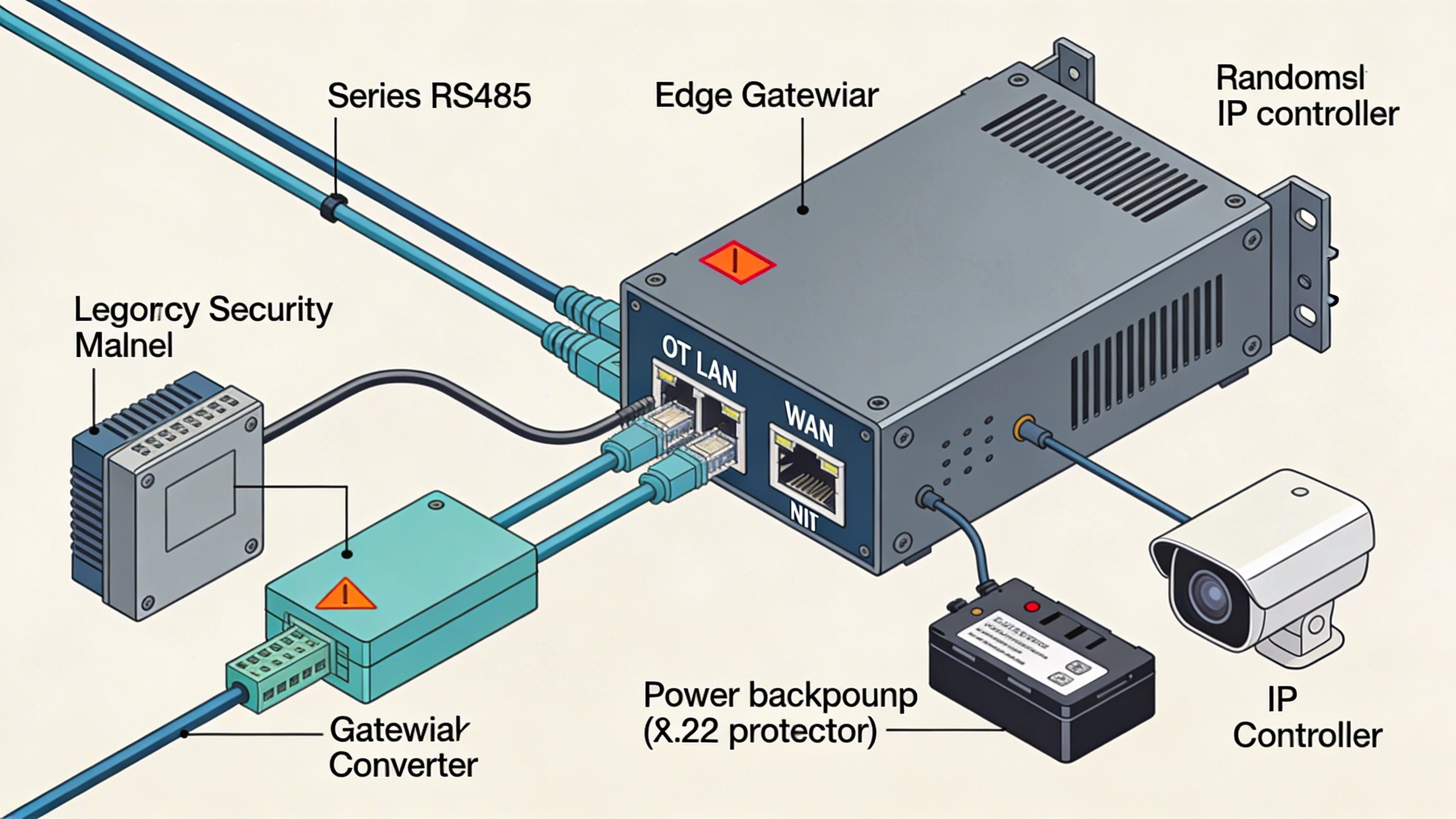
Cloud-native shifts computation off-site, with devices phoning home via WebSockets for persistent channels. This eases scaling but requires robust edge buffering for spotty connectivity. Consider a topology where controllers fan into a PoE switch, then a hardened gateway with dual NICs—one for OT, one for WAN. Firewalls segment VLANs, blocking unsolicited inbound except NTP sync for timestamps, as detailed in the NTP glossary. Tradeoffs emerge in failover: gateways offer sub-minute cutover via VRRP, while cloud relies on exponential backoff, delaying recovery.
Hybrid designs layer both, using gateways for always-on telemetry and cloud for ad-hoc sessions. This balances cost and resilience, especially in brownfield sites where ripping out legacy wiring isn't feasible.
Operational workflows and field constraints
Field teams operate under tight windows, often coordinating with OT staff wary of network changes. Workflows start with provisioning: gateways auto-register via QR codes scanned on-site, pulling configs from a vault. Daily ops involve dashboard triage—flagging door tamper alerts for remote reset—escalating to physical dispatch only for hardware faults. Constraints like 4G latency at remote utilities dictate bursty polling over constant streams.
Maintenance shifts to predictive modes, with gateways streaming vibration data from panels to flag loose mounts before failure. Constraints amplify in extreme environments: dust at construction sites clogs fans, demanding IP67 enclosures. Workflows incorporate staged rollouts, activating remote access building-by-building to contain issues. Technicians carry mobile authenticators, enabling on-the-fly overrides without full admin rights.
Training bridges gaps; operators learn to distinguish network blips from device faults via color-coded dashboards, reducing false escalations.
Common failure points and design mistakes
Over-reliance on VPNs exposes the biggest pitfall: once tunneled, the entire OT subnet becomes traversable if credentials leak. Designs without micro-segmentation allow malware to pivot from a compromised camera to controllers. Another mistake is ignoring certificate lifecycles; expired roots drop connections silently, stranding sites until manual intervention.
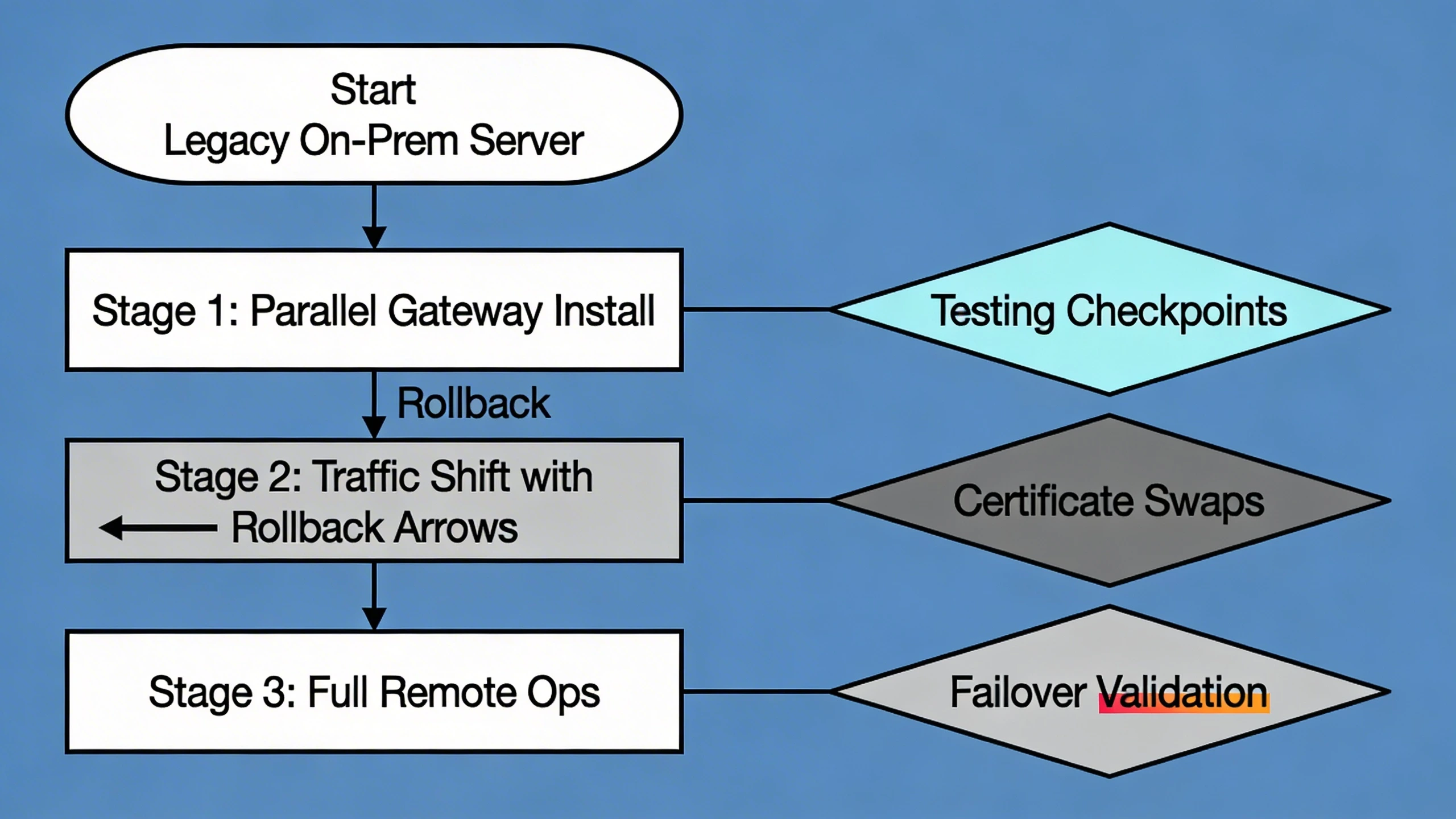
Bandwidth miscalculation strands video feeds, where 1080p streams choke 10Mbps uplinks. Mistakes compound in multi-vendor setups, where gateways assume uniform APIs but face dialect variations. Failures cascade during firmware pushes if rollback lacks atomicity, bricking panels mid-update. Observed issues trace to unbuffered queues overflowing in storms, losing audit trails.
Avoidance demands staged load testing and canary deployments, validating under simulated brownouts.
What to verify before procurement
Scrutinize gateway throughput under mixed loads—MQTT pub/sub plus SIP for intercoms—not just peak specs. Confirm protocol fidelity: does it preserve binary door commands without reformatting? Interrogate failover specs, ensuring local mode sustains core functions like badge reads during WAN loss.
Probe security posture: runtime attestation, secure boot, and FIPS-validated crypto. Vendor history matters—seek deployments in critical infrastructure security. Test client compatibility across browsers and thick clients, avoiding lock-in.
Finally, review SLAs for portal uptime and support response, aligning with your MTTR targets. Hands-on PoCs reveal integration snags early.
Where to go next
Explore FortSense 4 for reference architectures tailored to these patterns. For site-specific advice, including North America deployments, request a design review.
Image Production Brief (Internal - Remove Before Publish)
Recommended image count: 3
- Placement: After the introduction
Insert After: Introduction
Purpose: Visualizes the core topology to ground the retrofit scenario discussed, helping readers map concepts to their sites.
Prompt: Clean line diagram of a security system remote access topology: IP door controllers and ONVIF cameras connected via PoE switch to an edge gateway in a utility building; gateway shows outbound TLS arrows to cloud management portal; remote admin laptop connects via zero-trust browser session; label VLAN segments and firewall rules.
Alt Text: Topology diagram for remote access in security systems - Placement: After system architecture section
Insert After: System architecture and integration considerations
Purpose: Illustrates physical wiring integration, clarifying how gateways connect to legacy devices without full rewiring.
Prompt: Wiring diagram showing edge gateway integration: serial RS485 from legacy panels to gateway converter, Ethernet to IP controllers and cameras; dual NICs labeled OT LAN and WAN; include power backup and enclosure details for field deployment.
Alt Text: Wiring diagram for gateway integration in security systems - Placement: After common failure points section
Insert After: Common failure points and design mistakes
Purpose: Depicts a step-by-step migration path, highlighting pitfalls to avoid during retrofit from legacy to remote-enabled setup.
Prompt: Migration diagram flowchart: Start with legacy on-prem server; Stage 1 parallel gateway install; Stage 2 traffic shift with rollback arrows; Stage 3 full remote ops; callouts for testing checkpoints, certificate swaps, and failover validation.
Alt Text: Migration diagram for implementing remote access
Remote access and one-way monitoring solve different problems. If the site only needs outbound alarm visibility from an isolated security network, review the data diode integration guide before opening interactive remote paths.