When upgrading security at a utility substation or multi-building campus, integrators often encounter the challenge of integrating modern video management systems (VMS) with existing alarm panels across segmented networks. Legacy setups relied on permissive flat networks, but regulatory pressures and rising threats demand granular firewall controls. A common scenario involves a VMS server pulling event data from distributed alarm gateways while streaming video for verification—flows that require bidirectional communication yet minimal exposure.
The primary design principle here is least-privilege access: begin with a deny-all policy and explicitly allow only the protocols, ports, and endpoints needed for VMS-alarm handshakes. For example, VMS platforms typically initiate HTTPS API calls to alarm systems on standard web ports, supplemented by UDP streams for real-time alerts. Alarm panels, in turn, may push status updates via TCP connections or proprietary protocols. Getting this right prevents event blackouts during incidents while aligning with Zero Trust Architecture glossary tenets, where every flow is inspected and logged.
This approach shines in retrofit projects, such as segmenting a hospital's VMS from its OT alarm network. Without tailored rules, integrators risk either over-permissive configs that invite lateral movement or overly restrictive ones that drop critical triggers, delaying response times.
What the design decision looks like in practice
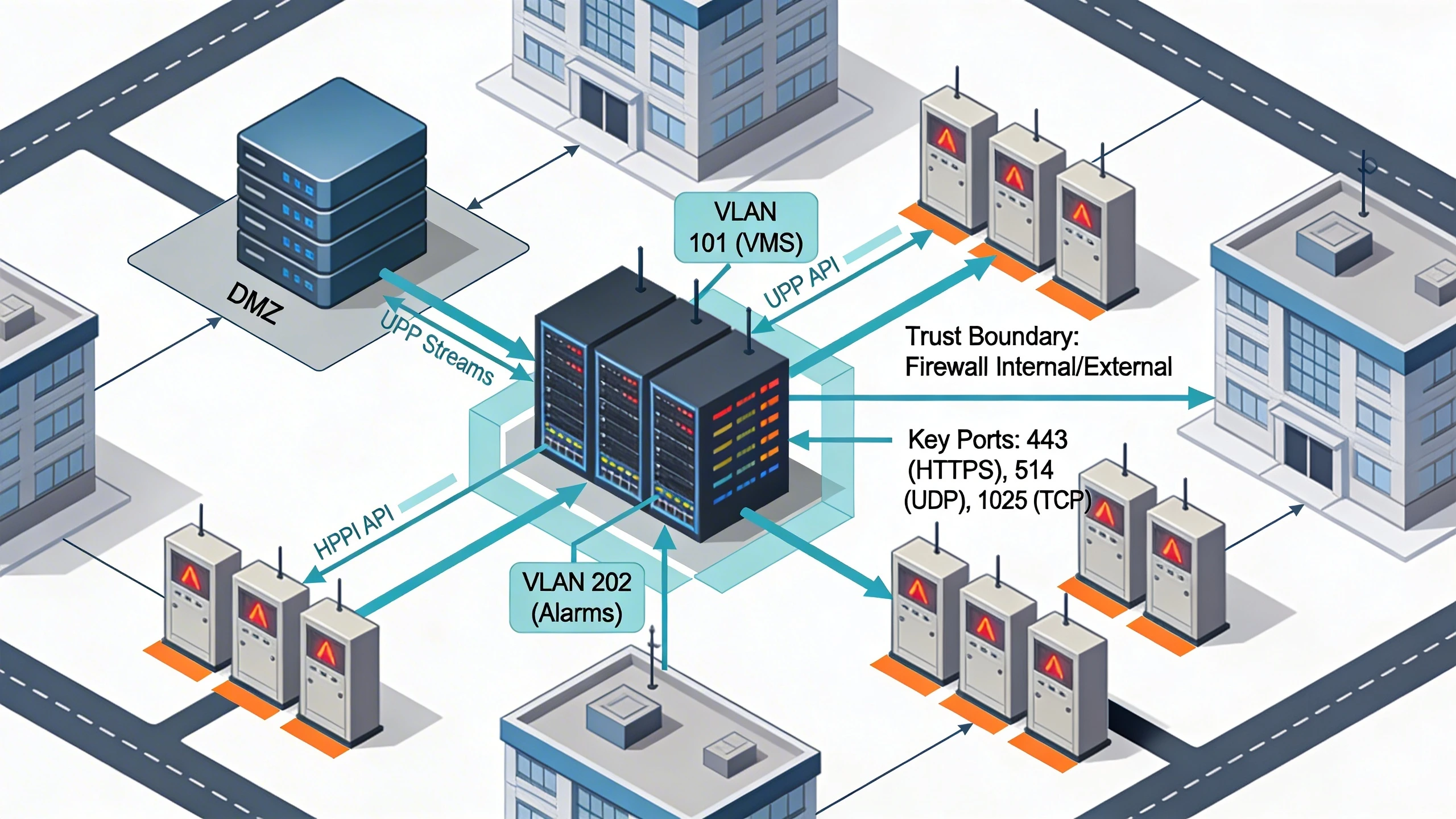
In a typical campus retrofit, the firewall sits between the VMS server cluster—often in a DMZ—and alarm panels scattered across buildings or remote sites. Design starts by mapping data flows: VMS queries alarms for door events via RESTful APIs over TLS, while alarms forward dry-contact triggers or zone statuses. Rules might permit inbound TCP 443 from VMS IPs to alarm management ports, with stateful inspection ensuring responses stay within session bounds.
Consider a utility site where solar inverters tie into alarms, and VMS verifies intrusions via overlaid camera feeds. Firewall rules whitelist ephemeral UDP ports for multicast event broadcasts, but restrict source IPs to trusted VLANs. This setup allows alarms to notify VMS of faults without opening floodgates to the internet-facing perimeter. Teams document these in zone-based policy tables, prioritizing rules by criticality—video polling lower than emergency escalations.
Implementation involves tools like vendor firewalls with application-layer gateways that recognize ONVIF or alarm dialects, reducing false positives from deep packet inspection. Regular audits rotate keys and prune stale rules, adapting to firmware updates on VMS or alarms.
System architecture and integration considerations
Architecturally, place firewalls at trust boundaries: between VMS application servers and alarm aggregators, or edge gateways linking remote panels to central VMS. In layered designs, inner firewalls segment VMS databases from integration buses, using protocols like MQTT for lightweight alarm pub-sub over TLS. This isolates breaches—if an alarm endpoint compromises, lateral spread halts at the next hop.
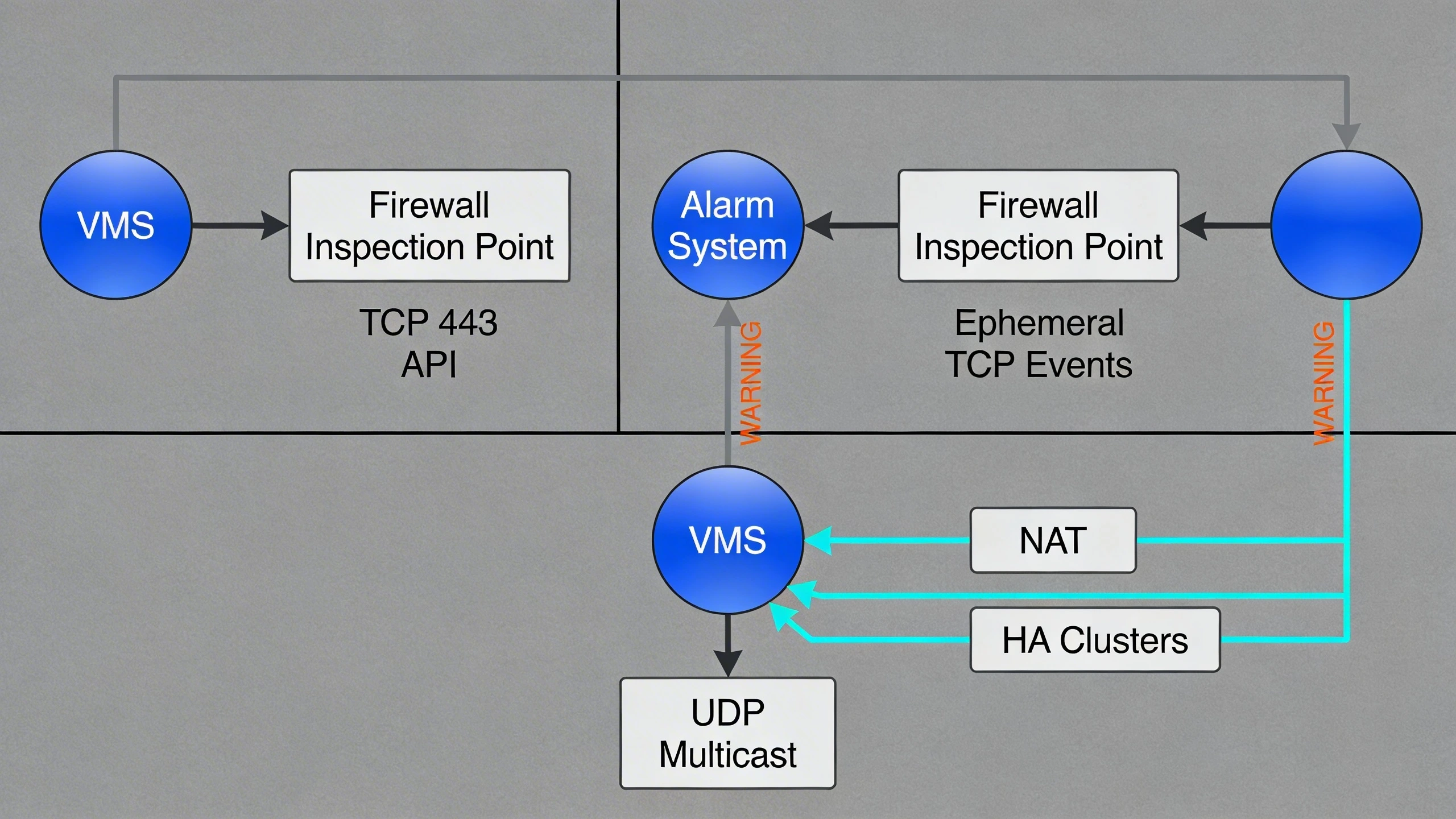
Integration hinges on protocol compatibility; VMS often exposes SDKs for custom hooks, but alarms vary from serial-over-IP to cloud relays. Firewall rules must account for asymmetric routing, where alarms initiate to VMS on dynamic ports. High-availability clusters demand symmetric rules across nodes, with health checks probing allowed paths. For VMS glossary scaling, load balancers front rulesets, distributing flows without single points of bottleneck.
Tradeoffs emerge in throughput: deep inspection slows UDP video proxies, so position lighter rules for streams versus encrypted API traffic. Hybrid clouds add complexity, requiring VPN overlays or SD-WAN policies mirroring on-prem rules.
Operational workflows and field constraints
Day-to-day operations revolve around rule maintenance amid firmware patches and hardware swaps. Field techs test rules via simulated events—triggering a door sensor to confirm VMS receipt—before live cutover. Workflows include logging all allowed/denied flows for forensics, with SIEM integration correlating firewall hits to alarm timelines.
Constraints in remote sites like oilfields include bandwidth limits, favoring rules that compress payloads or batch events. Mobile responders need temporary rules for VMS access, revoked post-shift via automation. Training emphasizes rule idempotency: changes propagate without downtime, using staged rollouts from staging firewalls.
- Schedule quarterly rule reviews tied to compliance cycles.
- Use automation scripts for ephemeral port ranges in dynamic environments.
- Integrate with ITSM for change tickets tracking rule mods.
Common failure points and design mistakes
A frequent misstep is overlooking return traffic in stateful rules, causing alarms to time out when pushing to VMS. Another is blanket port opens for 'video'—554 for RTSP invites exploits if not IP-bound. In multi-tenant campuses, shared rules leak between tenants, violating segmentation.
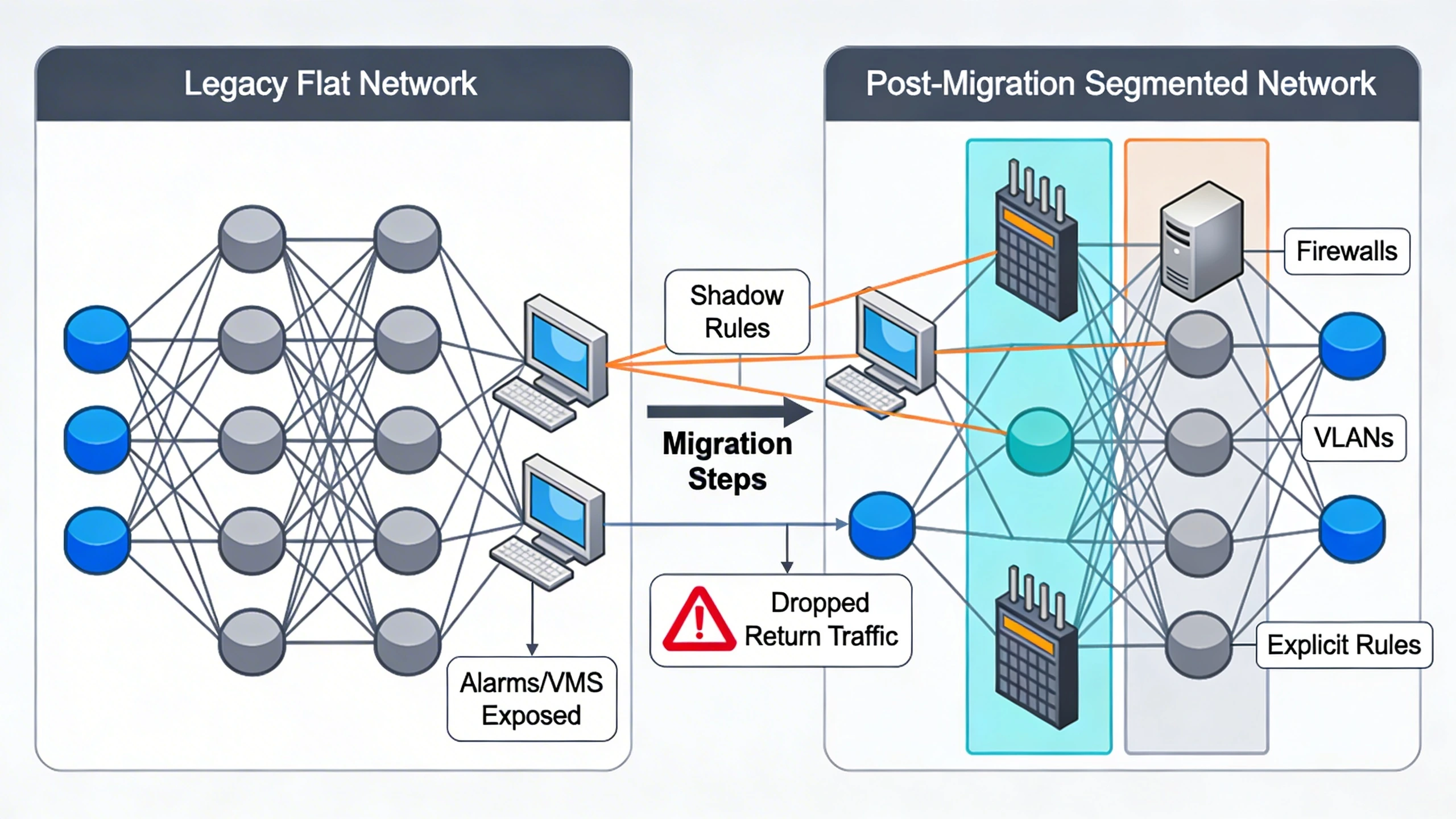
Over-reliance on vendor defaults exposes deprecated ports, while ignoring NAT traversal breaks remote alarm tunnels. During migrations, parallel old/new rules create shadows, amplifying attack surfaces until cleanup. Neglecting logging floods storage or misses stealthy probes.
Design flaws compound in scale: flat rulesets don't adapt to VMS sharding, leading to hotspots. Firmware mismatches alter ports mid-deploy, stranding integrations without rollback plans.
What to verify before procurement
Before selecting firewalls or VMS/alarm bundles, confirm protocol support via PoCs: simulate 1000 events/sec to baseline latency under rules. Audit vendor docs for port matrices, ensuring alignment with your flows—no assumptions on 'auto-discover'.
Evaluate management planes: does the firewall UI export rule diffs for audits? Check HA failover preserves sessions for ongoing streams. Probe integration APIs for custom rule generators, easing FortSense 4 deployments.
- Validate DPI signatures for your VMS/alarm payloads.
- Test asymmetric flow handling in lab topologies.
- Confirm logging formats feed existing SIEM.
Where to go next
Deploy these principles with FortSense 4, tailored for cyber-physical environments. For critical infrastructure security insights, explore our guides. Schedule a review via Request a design review, especially for North America deployments.
Image Production Brief (Internal - Remove Before Publish)
Recommended image count: 3
- Placement: After the introduction
Insert After: Introduction
Purpose: Visualizes the core network topology to ground readers in a realistic retrofit scenario, showing firewall placement between VMS and alarms.
Prompt: Clean line diagram of a campus network: VMS server in DMZ, firewall with zones, multiple alarm panels across buildings, arrows for HTTPS API, UDP streams, and TCP events; label VLANs, trust boundaries, and key ports.
Alt Text: Campus network topology diagram for VMS-alarm-firewall integration - Placement: After System architecture and integration considerations
Insert After: System architecture and integration considerations
Purpose: Details protocol flows and firewall rule layers, helping integrators map their own architectures.
Prompt: Flowchart showing bidirectional data paths: VMS to alarms (TCP 443 API), alarms to VMS (ephemeral TCP events), UDP multicast; include firewall inspection points, NAT, and HA clusters.
Alt Text: Protocol flow diagram through segmented firewalls - Placement: After Common failure points and design mistakes
Insert After: Common failure points and design mistakes
Purpose: Illustrates a migration sequence from legacy flat network to segmented rules, highlighting pitfalls like shadow rules.
Prompt: Before-after migration diagram: left side flat network with alarms/VMS exposed; right side post-migration with firewalls, VLANs, explicit rules; sequence arrows for steps, callouts for failures like dropped returns.
Alt Text: Migration diagram from permissive to rule-based VMS-alarm network
Firewall policy should not be used to fake one-way isolation. Where the requirement is hardware-enforced directionality, compare the rule set with the data diode integration guide and document which commands cannot cross the boundary.