Picture a security integrator tasked with upgrading surveillance at a chain of remote utility substations scattered across rural areas. These sites rely on video feeds, access controls, and environmental sensors to feed into a central management system. Historically, teams have leaned on VPNs layered over whatever connectivity is available—DSL where possible, public cellular as backup. But as 5G rolls out and threats evolve, questions arise: Does a private APN deliver the reliability edge needed for mission-critical operations, or does the added complexity outweigh the benefits?
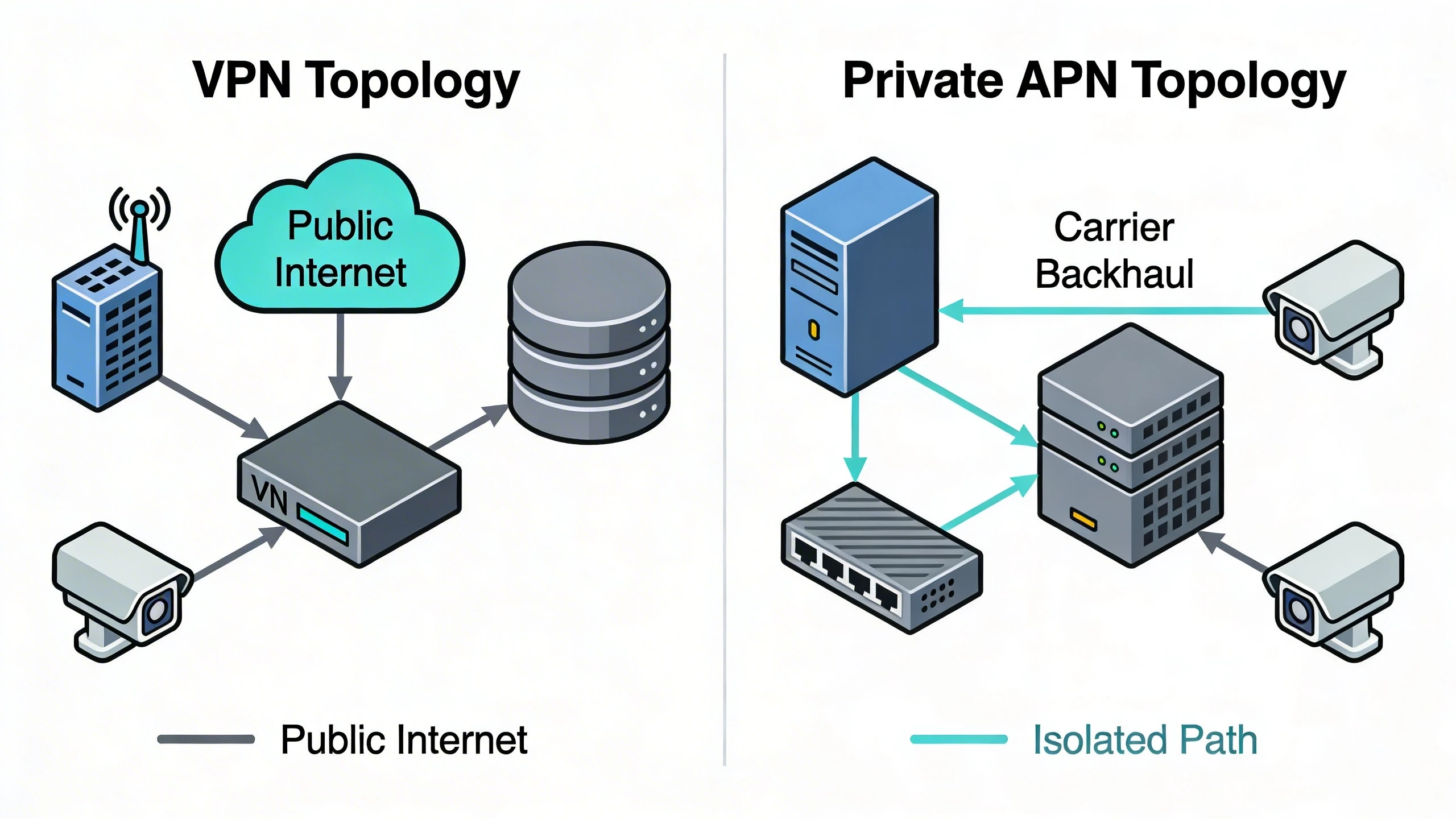
The shift often boils down to this: VPNs provide flexible encryption across diverse links but inherit the unpredictability of public internet paths, leading to jittery video streams or delayed alarms during congestion. Private APNs, by contrast, route traffic through a carrier-provisioned gateway that bypasses the public internet entirely, offering a more predictable path with SLAs tailored for IoT loads. For high-stakes environments like perimeter security or critical infrastructure, this isolation reduces exposure while simplifying remote management—though it demands upfront carrier coordination.
Teams evaluating this for a campus expansion or multi-site retrofit typically find private APNs excel where constant uptime trumps cost, especially as device counts scale. Yet VPNs remain viable for hybrid setups. Let's dive into what this means on the ground.
What changes in real deployments
Deploying connectivity at remote security sites starts with the physical layer, but the choice between VPN and private APN ripples through operations. With VPN, a cellular router at the site establishes an IPsec or OpenVPN tunnel to a headend appliance, encapsulating all traffic. This works seamlessly for initial setups but strains under load: encryption overhead chews CPU on edge devices, and tunnel flaps during signal handoffs disrupt ongoing streams. In a real-world retrofit of a 20-site oilfield perimeter, we've seen integrators chase false alarms from these interruptions, forcing redundant tunnels that complicate firewall rules.
Private APN deployments flip the script by embedding isolation at the cellular core. SIMs provisioned for the APN connect directly to a dedicated carrier gateway, which peers with your data center via a managed handoff—often MPLS or direct connect. No public routing means steadier throughput for high-bandwidth video, and carriers handle handoffs across towers. The change feels subtle at first: simpler router configs without VPN clients. But over time, it shifts maintenance from your team to the carrier, freeing cycles for core security tasks. One caveat—provisioning can take weeks, so timeline it early.
Operational cadence alters too. VPN monitoring focuses on tunnel health and endpoint certs; private APN shifts to SIM status and gateway metrics, often via carrier portals. This reduces on-site visits but introduces dependency on carrier responsiveness.
Security and reliability differences
Security postures diverge sharply because of where threats lurk. VPNs encrypt end-to-end, shielding payloads from prying eyes on transit paths—but those paths snake through public internet peering points, vulnerable to DDoS or route leaks. A compromised VPN headend exposes all sites, and key rotation mishaps can blackhole traffic. Reliability suffers from single points: headend outages or crypto mismatches halt everything. In security contexts, this means potential blind spots during incidents, where forensics later reveal latency spikes masked alarm priorities.
Private APNs enforce separation upstream: traffic stays in carrier backhaul until your gateway, minimizing attack surface. No internet exposure cuts risks from malware scanning public IPs, and carriers apply enterprise-grade filtering at the APN core. Reliability climbs with dedicated capacity—QoS policies prioritize video over bulk uploads—and SLAs guarantee uptime beyond consumer cellular. For remote sites, this translates to fewer brownouts during peak hours, critical for real-time analytics or PTZ control.
That said, neither is bulletproof. Private APNs rely on carrier SIM auth, so lost/stolen cards demand swift blacklisting. VPNs offer granular access via RADIUS, but scaling policies across sites invites misconfigs. Often, layering VPN over private APN marries both worlds for defense-in-depth.
Wiring, topology, and integration implications
At the site level, wiring stays familiar: a rugged cellular router with Ethernet switches feeds cameras, door readers, and edge gateways. For VPN, add client software or hardware acceleration, plus UPS for tunnel stability. Topology funnels all sites to a central concentrator, creating a star pattern that bottlenecks at scale. Integration with VMS like Milestone or Genetec involves static routes and NAT traversal tweaks, straightforward but fiddly for dynamic IPs.
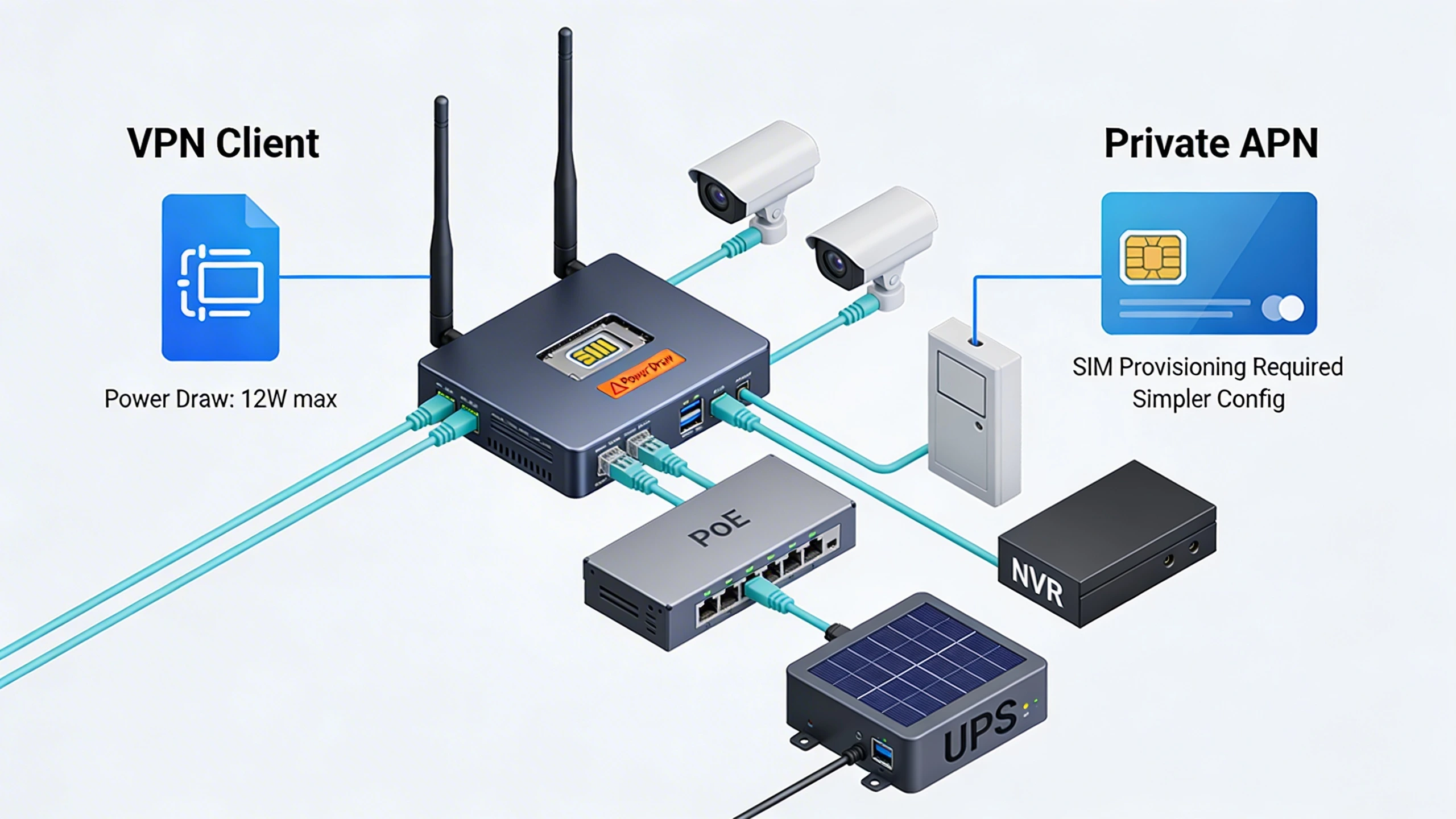
Private APN simplifies wiring—no VPN stack means lighter routers suffice, and SIM swaps handle provisioning. Topologically, it's a flatter mesh: sites peer via the APN gateway to your network, easing multicast for video pulls. Integration shines in hybrid IT setups; the APN often supports BGP peering for seamless VLAN extension. Drawbacks emerge in multi-carrier zones—roaming needs explicit config— but for single-provider coverage, it streamlines failover to wired backups.
Power and enclosure choices amplify differences: VPN routers guzzle more juice under encrypt load, demanding beefier solar setups at off-grid sites.
Migration planning and common failure points
Migrating starts with inventory: map current VPN tunnels, bandwidth usage, and outage logs to baseline needs. Pilot on one site—provision APN SIMs, redirect traffic, monitor for latency. Phased rollout follows: cluster by geography to minimize carrier setup waves. Common pitfalls include overlooking firewall handoffs at the APN gateway, causing asymmetric routing that drops packets. Another: assuming cellular coverage mirrors wired—signal surveys prevent black spots.
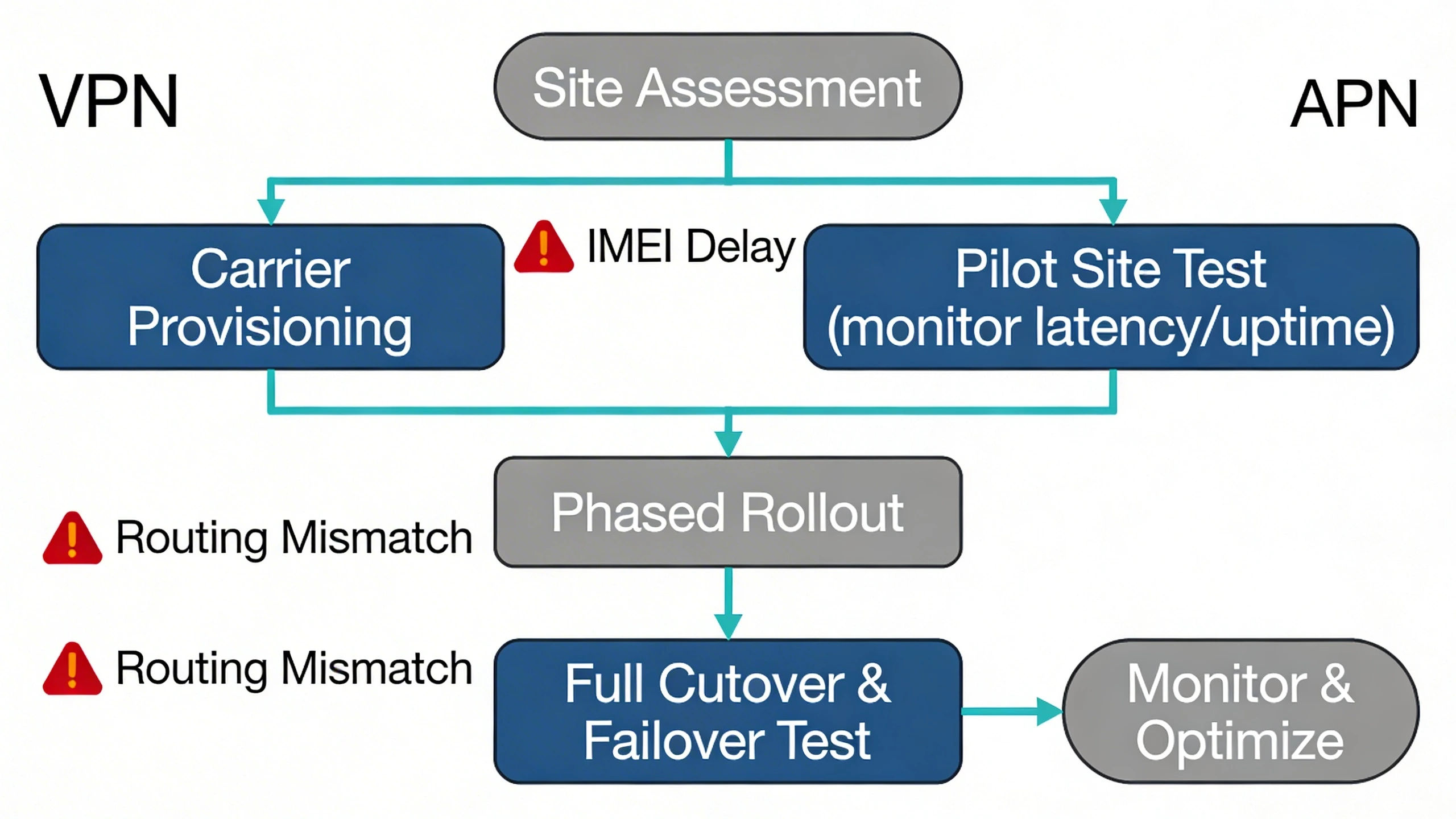
Failure points cluster around change management. VPN cutover risks cert expiry mid-migration; private APN trips on IMEI whitelisting delays. Test failover rigorously—simulate carrier blips to validate local buffering. Post-go, watch for APN quota exhaustion from firmware updates. Success hinges on carrier SLAs with penalties, plus automation for SIM lifecycle.
Where each approach still fits
VPN holds ground in budget-constrained or opportunistic deploys, like temporary construction cams or sites with spotty cellular. Its universality shines for brownfield integrations over leased lines, and open-source options keep costs low. For IT managers blending office and edge, VPN unifies policy under existing NAC tools.
Private APNs dominate where assurance matters: utility perimeters, campus outliers, or any site demanding sub-second response. They future-proof for 5G slicing, aligning with Zero Trust Architecture glossary by minimizing trust zones. Hybrids persist for phased upgrades.
Where to go next
Explore FortSense 4 for unified management across connectivity types. For critical infrastructure security projects, especially in North America deployments, request a design review to tailor these options.
Image Production Brief (Internal - Remove Before Publish)
Recommended image count: 3
- Placement: After the introduction
Insert After: Introduction
Purpose: Visually introduces the core topologies, setting up the comparison early for technical readers.
Prompt: Clean line diagram contrasting VPN topology (remote site cellular router over public internet to VPN concentrator then data center) versus private APN (site router direct via carrier backhaul to private gateway peering with data center). Use icons for cameras, routers, clouds; label flows and key differences like 'Public Internet' vs 'Isolated Path'.
Alt Text: High-level topology: VPN over public links vs private APN isolation - Placement: After 'Wiring, topology, and integration implications'
Insert After: Wiring, topology, and integration implications
Purpose: Supports the wiring discussion with concrete site-level visuals, aiding integrators in planning hardware.
Prompt: Detailed wiring diagram for a remote security substation: show cellular router with SIM slot, Ethernet connections to IP cameras, door controller, NVR; differentiate VPN (with VPN client icon, power draw note) and private APN (SIM provisioning note, simpler config); include PoE switch and solar UPS.
Alt Text: On-site wiring diagram comparing VPN and private APN setups - Placement: After 'Migration planning and common failure points'
Insert After: Migration planning and common failure points
Purpose: Guides readers through migration with a step-by-step visual, reducing planning errors.
Prompt: Migration flowchart from VPN to private APN: start with 'Site Assessment', branches to 'Carrier Provisioning', 'Pilot Site Test (monitor latency/uptime)', 'Phased Rollout', 'Full Cutover & Failover Test', end with 'Monitor & Optimize'. Include pitfalls as red warning icons like 'IMEI Delay' or 'Routing Mismatch'.
Alt Text: Step-by-step migration flowchart from VPN to private APN