In a typical retrofit of a utility substation's perimeter security—think 50 cameras, 20 access controllers, and scattered sensors across a fenced compound—firmware lifecycle management often emerges as the linchpin holding the project together or unraveling it. Teams face devices from multiple vendors, each with staggered support cycles and incompatible update mechanisms. The upfront decision to centralize updates through a unified management platform versus relying on vendor portals can shave weeks off deployment timelines and prevent outages during critical operations. Forward-thinking integrators prioritize platforms that support staged rollouts, cryptographic verification, and automated rollback, ensuring devices stay patched without exposing the site to unmitigated risks.
Consider a multi-building campus where access control panels control hundreds of doors. Legacy firmware leaves doors vulnerable to known exploits, but blanket updates risk bricking endpoints during peak hours. The effective path forward integrates firmware management into the broader VMS ecosystem, leveraging synchronized time via NTP for audit trails and coordinating updates across air-gapped segments. This approach not only addresses immediate vulnerabilities but scales to handle future expansions, like adding biometric readers or integrating with SCADA systems.
These scenarios underscore why firmware lifecycle management demands more than ad-hoc patching; it's about embedding resilience into the system design from the outset. Integrators who treat it as a core architecture choice—rather than an afterthought—achieve smoother migrations and lower long-term maintenance burdens.
What the design decision looks like in practice
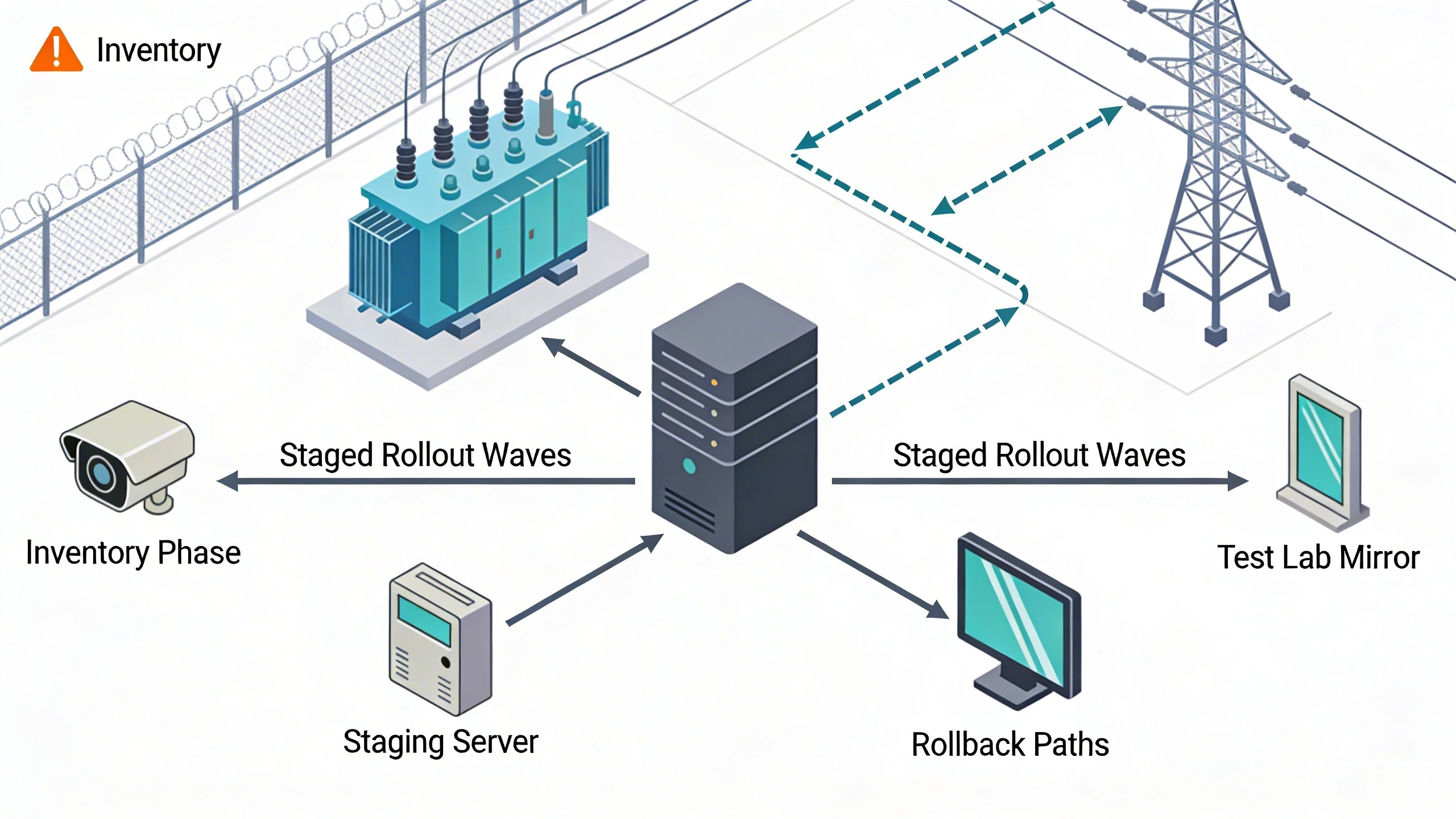
When retrofitting a high-assurance site like a data center perimeter, the firmware lifecycle decision manifests in the staging yard before devices even hit the field. Inventory all endpoints, map their current versions against vendor end-of-support dates, and classify them by risk tier—say, cameras exposed to public networks first. A solid design opts for a management console that inventories automatically via SNMP or proprietary protocols, then sequences updates: test in a mirrored lab environment mimicking the site's topology, pilot on 10% of devices, and roll out in waves tied to maintenance windows.
In practice, this played out during a campus door controller upgrade where mismatched firmware versions caused intermittent reader failures post-update. The fix involved a dual-bank bootloader design, allowing seamless rollback if post-update health checks failed. Field teams appreciated the visibility dashboard showing update status per device, complete with geolocation tags for remote sites. Without this structured approach, migrations devolve into fire-drills, with technicians chasing ghosts across rooftops or underground vaults.
Success hinges on predefining success metrics: zero-downtime tolerance for critical paths, 99% update completion within 48 hours, and verified integrity via digital signatures. Teams that script these into CI/CD pipelines for firmware treat it like software deployment, borrowing from IT practices while respecting physical constraints.
System architecture and integration considerations
Architecturally, firmware management thrives in a hub-and-spoke model where a central server orchestrates updates over segmented networks, isolating OT from IT where possible. For security devices, this means VLANs funneling update traffic through firewalls with application-layer inspection, ensuring only signed payloads traverse. Integration with existing VMS platforms requires API hooks for event correlation—firmware updates triggering camera reboots must sync with recording continuity to avoid blind spots.
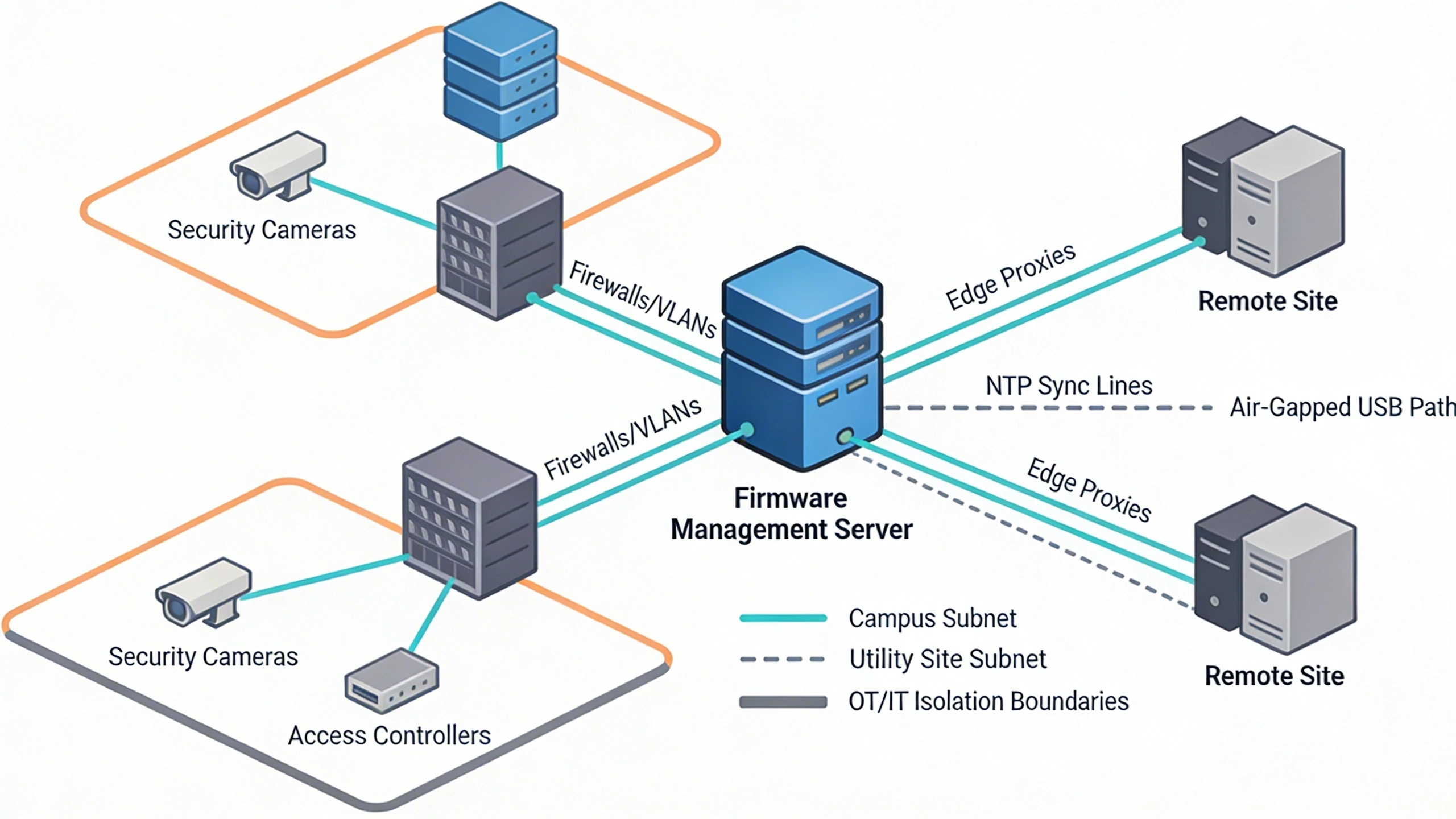
Time synchronization via NTP becomes non-negotiable here, as update logs demand precise timestamps for compliance audits in regulated environments. Consider a utility site where devices span multiple subnets; the architecture incorporates proxy nodes at edge gateways to cache firmware images, reducing WAN dependency and enabling offline queuing. Tradeoffs emerge in air-gapped setups: USB-based updates demand tamper-evident media and manual verification, contrasting with OTA efficiencies but offering superior isolation.
Scalability tests the design—handling 1,000-node fleets requires delta updates (patching only changes) over full images to conserve bandwidth. Interoperability shines when the system supports standards like IEC 60870 for industrial controls, bridging security silos without custom middleware.
Operational workflows and field constraints
Day-to-day operations revolve around scheduled vulnerability scans feeding into a prioritization queue, where high-CVE firmware gets flagged for immediate staging. Field workflows adapt to constraints like battery-powered sensors or rooftop cameras inaccessible without cranes: pre-provision updates during install, with remote activation post-cutover. Technicians carry rugged tablets running the management app, scanning QR codes on devices for instant status and one-tap updates.
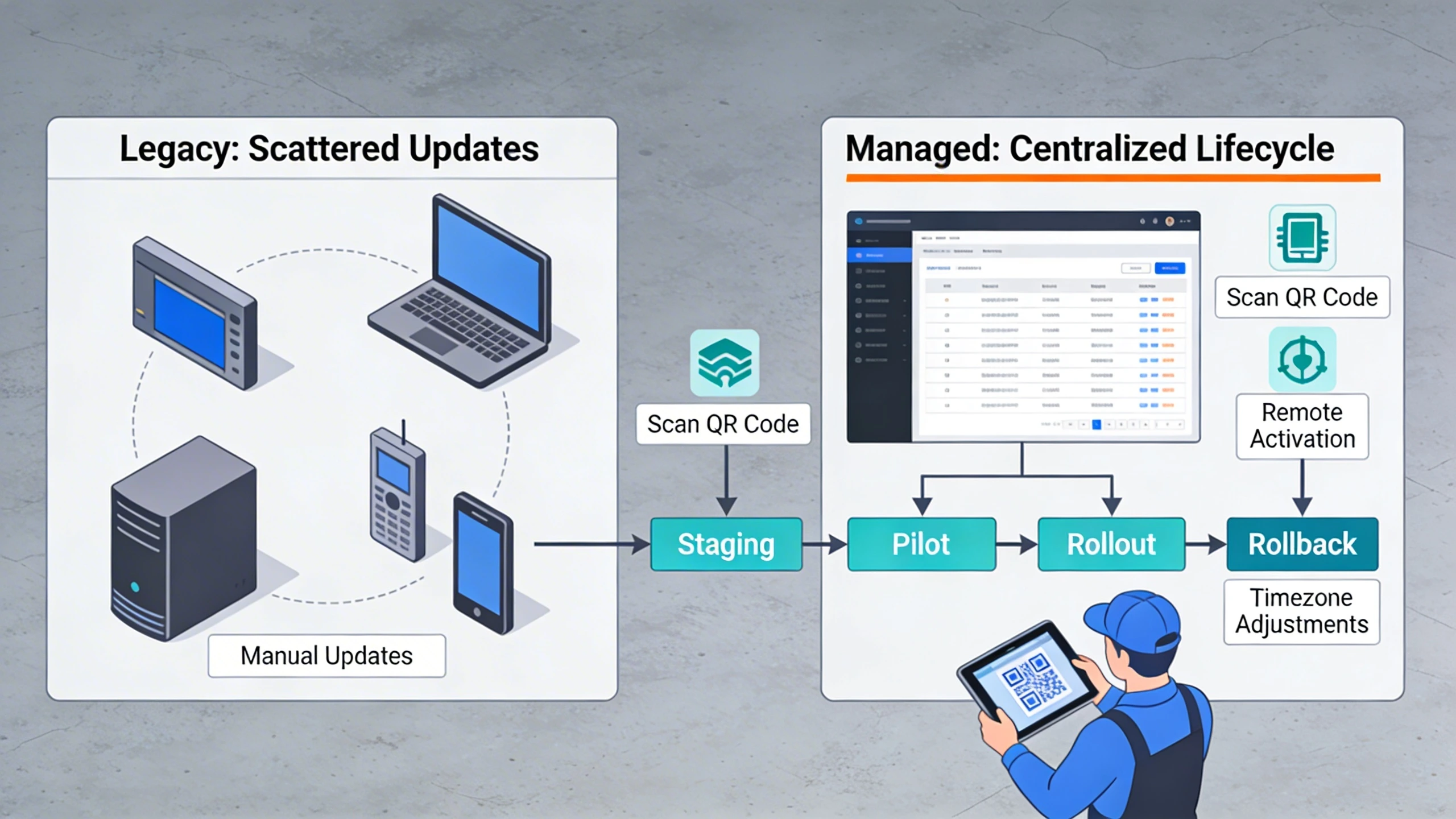
In practice, a multi-site integrator managing North America deployments learned the hard way about timezone variances disrupting NTP-synced windows—workflows now include site-specific calendars auto-adjusting for DST. Constraints like power budgets dictate lightweight update protocols, favoring UDP multicast over TCP for fan-out efficiency in dense deployments. Rollback workflows must be idiot-proof: a single button triggers reversion, logging the chain of custody for forensics.
Training emphasizes dry-runs; simulating a fleet-wide update in a virtualized emulator catches workflow gaps before they hit live assets. This operational rigor turns firmware management from a chore into a proactive security posture.
Common failure points and design mistakes
One prevalent pitfall is ignoring bootloader granularity—updates overwriting recovery partitions leave devices bricked, stranding field teams without JTAG tools. In a building access retrofit, this surfaced when a vendor's monolithic updater failed on 15% of panels due to flash wear, underscoring the need for wear-leveling awareness in designs. Another mistake: assuming uniform hardware revisions; variant SKUs demand version branching, or else incompatibilities cascade into system-wide halts.
Network timeouts plague OTA in fringe coverage areas, where partial downloads corrupt images—designs falter without resume-capable protocols. Overlooking certificate chains exposes updates to MITM attacks; always chain to hardware root-of-trust. Migration errors compound when teams skip delta validation, bloating storage and inviting desyncs across hybrid fleets.
Underestimating rollback latency bites during incidents; if reversion takes hours, attackers exploit the window. The fix: dual-partition schemes with hot-swap logic, tested under load.
What to verify before procurement
Before committing, probe the platform's update atomicity—does it guarantee consistent states across multi-device clusters, or risk partial failures? Scrutinize signing mechanisms: ECDSA over SHA-256 minimum, with key rotation policies. Inventory automation depth matters; manual CSV uploads scale poorly beyond dozens of devices.
Field-test rollback speed and success rates in your topology emulator. Confirm offline support for remote assets, and API extensibility for VMS hooks. Vendor SLAs should cover image hosting longevity, matching your EOL planning.
Finally, audit logging granularity—event-level details for compliance—and bandwidth profiling to fit your pipes.
Where to go next
Ready to apply these strategies to your critical infrastructure security setup? Explore FortSense 4 for integrated lifecycle tools tailored to integrators. For North America deployments, request a design review to benchmark your firmware posture.